Marketing automation rules let performance marketing teams run repeatable campaign tasks without checking a dashboard every hour. Marketing automation rules are predefined if-then instructions that monitor campaign data and trigger an action, such as pausing a source, adjusting a cap or sending an alert, when a condition is met.
This guide, current as of November 2026, answers three questions for advertisers, app marketers, publishers and affiliate networks. What makes an automated task valuable? How can teams set up and measure marketing automation rules? How can the right technology help scale them?
Short answer:
Marketing automation rules are if-then conditions that act on campaign data automatically. The six tasks best suited to them are performance monitoring, partner management, anomaly alerts, postback sync, bid and budget adjustments, and reporting updates. Teams keep strategy and partner decisions, and rules handle the repeatable work around the clock.
Key takeaways
- Marketing automation rules are if-then conditions that trigger campaign actions when tracked data meets a defined threshold.
- Six repeatable tasks suit rules: monitoring, partner management, anomaly alerts, postback sync, bid and budget adjustments, and reporting.
- Accurate event tracking and S2S postbacks supply the data that rules read.
- Teams keep strategic decisions, such as partner selection and creative direction, while rules handle routine thresholds.
- Swaarm connects event-level tracking, reporting and fraud prevention to support rule-based campaign management.
What Are Marketing Automation Rules?
Marketing automation rules are predefined conditions that tell a campaign platform what to do when tracked data reaches a threshold. Each rule combines a trigger, a condition and an action, such as sending an alert when conversion rate falls below target. Rules run continuously, so routine decisions happen as data changes.
Unlike AI-driven optimization, which may use predictive models to recommend decisions, marketing automation rules follow predefined conditions. Marketing automation rules therefore make automated actions predictable, measurable and easy for teams to review, and the two approaches can work side by side.
Advertisers, app marketers, publishers and affiliate networks use rule-based automation across the campaign lifecycle, while manual management stays valuable for strategy, creative testing and partner negotiation. According to GrowthLoop and Ascend2 (2025), 31% of North American marketers use AI to optimize campaign journeys, and 37% say human intervention is still needed.
Swaarm Perform, the network and affiliate tracking product from Swaarm, records the clicks and conversions that rules read. Swaarm Perform’s Alerts notify users, change statuses, block publishers or blacklist sub IDs when a condition is met, and Workflows run scheduled operations across many offers, publishers or advertisers.
How Do Manual and Rule-Based Campaign Workflows Compare?
Manual workflows rely on a person to check a dashboard, decide and change a setting. Rule-based workflows define the trigger and action in advance, so the platform applies the decision when conditions are met. Both models are valuable: manual workflows suit strategic judgment, and rule-based workflows suit repeatable thresholds.
Model A: check dashboard → decide → edit setting → note result. Model B: define trigger → set condition → automatic action → review log.
| Journey step | Manual workflow | Marketing automation rules |
|---|---|---|
| What starts the task | A person opens the dashboard on a schedule | A trigger, such as a time or a data threshold |
| Who decides | The campaign manager, at review time | The campaign manager, in advance, when writing the rule |
| How the change is applied | Edited by hand in the platform | Applied automatically by the platform |
| How the result is recorded | Notes or memory | A timestamped rule log |
Which Campaign Tasks Should You Stop Managing Manually?
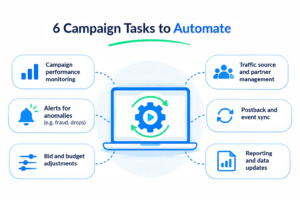
Repeatable campaign tasks with clear thresholds suit marketing automation rules best. The six strongest candidates are campaign performance monitoring, traffic source and partner management, anomaly alerts, postback and event sync, bid and budget adjustments, and reporting and data updates. Each follows a predictable pattern that fits a trigger, condition and action.
- Campaign performance monitoring. Rules check CPA, conversion rate and ROAS against targets on a set schedule, so teams see progress without opening a dashboard.
- Traffic source and partner management. Rules update partner access, offer status and tags when sources meet agreed goals.
- Alerts for anomalies. Rules notify the owner when a metric moves outside its expected range, so teams can respond quickly.
- Postback and event sync. Rules forward qualifying conversions and events to the right partner through S2S postbacks.
- Bid and budget adjustments. Rules shift caps, payouts or budgets toward sources that reach agreed performance goals.
- Reporting and data updates. Rules send scheduled reports and refresh data for the people who act on them.
Swaarm’s Alerts and Workflows cover threshold notifications, status changes, partner access and tag updates. Saved custom reports can also be emailed on a schedule.
How Can Marketers Set Up and Measure Marketing Automation Rules?
Marketers set up marketing automation rules by choosing a task, defining the trigger and condition, selecting the action and reviewing results against a baseline. Measurement compares the same metrics, such as CPA, ROAS and time spent on the task, before and after the rule goes live.
How Do You Set Up Marketing Automation Rules Step by Step?
To set up marketing automation rules, follow a repeatable process: pick one task, define the trigger and condition, choose the action, add a limit and a notification, test on a small segment, and review the log weekly. Starting with one task keeps results easy to measure and easy to adjust.
- Pick one repeatable task, such as daily cap pacing.
- Write the trigger, such as “every hour” or “at 80% of cap”.
- Set a minimum sample of clicks or conversions before the rule can act.
- Choose the action: adjust, schedule, route or alert.
- Add a notification so the owner sees every automated action.
- Review the rule log weekly and refine thresholds.
Consider a illustrative scenario where a fintech app marketer wants to scale a new-account campaign across three partners before a year-end promotion. The team tracks registration_complete and first_deposit with S2S postbacks and click ID passing. A rule raises a partner’s daily cap by 20% when first_deposit cost per action stays under target for three days, and every change triggers a notification. The marketer reads CPA and ROAS in weekly reports. The data shows which partners earn more budget, so the team shifts spend toward them and adds a day-7 funnel event. Illustrative example; figures are round numbers, not results.
Which Metrics Show That an Automation Rule Is Working?
A working automation rule improves a defined outcome without adding new work. Teams read CPA, ROAS, conversion rate and the time spent on the task, and compare them with the pre-rule baseline. A rule log showing each triggered action confirms that thresholds behave as designed.
Swaarm’s reporting across campaigns, partners and events supplies the baseline and follow-up numbers. Saved custom reports can be emailed on a schedule, and Alerts notify users in-app or by email.
What Do Marketing Automation Rules Need to Run at Scale?
Marketing automation rules need accurate event tracking, reliable postbacks, a clear attribution window and reporting that explains each automated action. When these four elements are in place, rules can read the same data as the team and act on it consistently across many offers and partners.
How Do S2S Postbacks Feed Marketing Automation Rules?
Server-to-server postbacks send conversion and event data from an advertiser or app to the tracking platform, using a click ID to match each event to its source. Marketing automation rules read this data, so accurate postbacks let a rule pace caps, adjust payouts and route events correctly.
Multi-step events such as registration_complete, level_10_reached and subscription_started show how far users progress, and each event gives a rule another signal. A rule log keeps every automated decision explainable.
How Do Attribution Windows Affect Rule Timing?
An attribution window is the period after a click or install during which a conversion can be credited to a source. Rules should wait until the window and any postback delay have passed before judging a source, so decisions use complete data.
On iOS, SKAdNetwork and AdAttributionKit define their own conversion value and postback timing, so iOS rules follow those schedules as of November 2026.
Swaarm provides event-level tracking of meaningful user actions, and Swaarm MMP covers mobile measurement, so rules can read events deeper in the funnel.
How Can You Build a Sustainable Automated Campaign Program?
A sustainable automated program combines clear ownership, conservative starting thresholds, validated data and a regular review cycle. Teams add marketing automation rules gradually, confirm each one against results, and keep a person responsible for every rule. Gradual rollout keeps automation aligned with campaign goals as volume grows.
How Does Traffic Quality Validation Protect Growth?
Traffic quality validation checks that conversions meet agreed criteria before a payout is approved or a source is scaled. Automated validation rules protect growth by keeping budgets focused on engaged users, and by giving advertisers, publishers and networks a shared, documented standard for approving conversions.
Quality control becomes more important as programs scale. Industry bodies such as IAB Tech Lab publish open standards that teams use as reference points when writing validation criteria. Swaarm’s fraud prevention supports this stage by checking traffic quality before conversions are approved.
Consider a illustrative scenario where a publisher monetization lead promotes a subscription app offer and wants payouts to follow engaged users. The team agrees with the advertiser that subscription_started is payable only when it arrives with a valid click ID inside the attribution window. A validation rule holds conversions that do not match, and a weekly report lists held and approved conversions by source. The monetization lead reviews the report, shares the criteria with partners and scales the sources whose approved share stays high. Illustrative example; figures are round numbers, not results.
When Should Teams Review or Override an Automation Rule?
Teams should review marketing automation rules weekly, after major offer changes and before seasonal peaks such as Q4. A review confirms that thresholds still match goals, payouts and attribution windows. A manual override remains available whenever strategy, partner agreements or creative priorities change.
Each rule carries a named owner, a creation date and a change log, so any teammate can see why the rule exists. Swaarm’s performance insights and reporting give teams the history needed for each review.
How Does Swaarm Support Rule-Based Campaign Management?
A platform supports rule-based campaign management by connecting tracking, validation, payouts, reporting and optimization in one workflow. Marketers need each stage to share the same data, so marketing automation rules act on numbers the whole team can see, verify and explain.
Swaarm is an all-in-one performance marketing tracking and attribution platform for advertisers, app marketers, publishers and affiliate networks. The journey below maps Swaarm capabilities to each stage of an automated campaign.
- Acquire. Swaarm Perform provides network and affiliate tracking, and offer management organizes the offers that partners promote. Advertisers and networks begin each campaign with a clear source and a clear offer.
- Track. Event-level tracking records meaningful user actions such as registration_complete and first_deposit. Swaarm MMP adds mobile measurement for app campaigns, giving rules deeper funnel signals to read.
- Validate. Fraud prevention checks traffic quality, so approved conversions meet the criteria that advertisers, publishers and networks have agreed.
- Reward. Rewarded tracking supports rewards tied to deep-funnel events such as level_10_reached, so partners are recognized for user progression.
- Analyze. Reporting across campaigns, partners and events shows which sources and events drive results, and gives every rule a documented baseline.
- Optimize. Performance insights guide decisions on budgets, payouts and offers. Performance insights guide decisions on budgets, payouts and offers. Alerts and Workflows then apply status, partner-access and tag changes automatically.
Marketing Automation Rules: Building value beyond manual optimization
Marketing automation rules create value when they turn repeatable decisions into consistent actions, giving advertisers, app marketers, publishers and networks more time for strategy, creative testing and partner relationships. That value shows up in steady caps, timely offers, accurate event data and clearer reports. A sustainable program needs a payout strategy, accurate event tracking and continuous optimization. Swaarm helps teams manage and measure each stage through event-level tracking, reporting across campaigns, partners and events, and fraud prevention.
Ready to put marketing automation rules to work?
Frequently Asked Questions
Which campaign tasks should i automate first?
Start with cap pacing, offer scheduling and threshold alerts, because these tasks have clear numbers and low risk. Once those rules run reliably, add payout adjustments, postback routing and traffic quality checks. Beginning with one task per campaign keeps results measurable and makes each rule easy to review.
Can marketing automation rules replace a campaign manager?
No. Marketing automation rules handle repeatable thresholds, while campaign managers handle strategy, partner relationships, creative direction and exceptions. Rules extend a campaign manager’s reach by applying decisions consistently around the clock, which gives the manager more time for the work that needs human judgment.
Do marketing automation rules work for ios app campaigns?
Yes. Marketing automation rules work for iOS app campaigns, provided they follow the timing of SKAdNetwork or AdAttributionKit postbacks and conversion values. Rules for iOS campaigns should wait for complete postback data before judging a source, and should use the conversion values defined for the campaign’s key events.
What is the best tool to automate affiliate campaign management?
The best tool for automating affiliate campaign management combines accurate event tracking, offer management, reporting and traffic quality controls in one platform. Teams should compare platforms on deep-funnel event tracking, validation and reporting by partner. Swaarm Perform is the network and affiliate tracking product from Swaarm.