Swaarm Reports Suite is the reporting layer in Swaarm that turns tracking data into numbers a team can explain, trust and act on. If you can’t explain the number, can you really optimise it? When advertisers, app marketers, publishers and affiliate networks can say why a number moved, they can decide what to scale next with confidence.
This article answers three questions in order. What makes a campaign number valuable enough to optimise? How can teams explain and measure the numbers behind every campaign, partner and event? How can the right reporting technology help maximise that value? Along the way, the article shows how Swaarm Reports Suite supports each step of performance marketing reporting.
Short answer: Yes, a team can optimise a number only when it can explain it. Swaarm Reports Suite breaks every headline number down by campaign, partner, offer and event, so advertisers, app marketers, publishers and networks can see exactly what drove each result and decide from evidence.
Key takeaways
- Swaarm Reports Suite connects spend, traffic and in-app events, so every outcome has a visible cause.
- Breakdowns by campaign, partner, offer and event turn a headline total into a decision.
- Event-level data shows user progression deeper into the funnel, beyond the install or click.
- Consistent attribution rules and date windows keep performance marketing reporting comparable from week to week.
- Swaarm Reports Suite gives every role one reporting layer across campaigns, partners and events.
What is Swaarm Reports Suite?
Swaarm Reports Suite is the reporting layer in Swaarm that shows clicks, installs, conversions, in-app events and revenue across campaigns, partners and offers. It links spend to outcomes using metrics such as CPI, CPA, CPE, ROAS and LTV, so marketers can explain each result and decide where to invest next.
Performance marketing reporting is the wider practice behind the product: the structured view of clicks, installs, conversions, in-app events and revenue across campaigns, partners and offers. It links spend to outcomes using metrics such as CPI, CPA, CPE, ROAS and LTV, so marketers can see what drove each result and where to invest next.
Performance marketing reporting sits between raw tracking data and a business decision. Tracking records each click, install and event. Campaign reporting then groups those records into views that answer practical questions, such as which partner drives the most completed registrations or which offer reaches the strongest ROAS.
Each role in the ecosystem reads performance marketing reporting differently. Advertisers use it to compare channels and partners. App marketers use it to follow users from install to deeper events. Publishers use it to see what their traffic earns. Affiliate networks use it to give advertisers and publishers the same clear picture.
Platforms such as AppsFlyer, Adjust, Singular, Kochava, Everflow and Branch all provide attribution reporting and conversion reporting, and each one organizes dimensions and metrics in its own way.
Swaarm in practice: Swaarm Reports Suite provides reporting across campaigns, partners and events, so every role works from the same set of numbers. Swaarm Reports Suite covers reporting across Swaarm’s products. Swaarm Perform handles campaign management and optimization, while Swaarm MMP covers app attribution. Swaarm’s Explorer tool lets teams analyze data across campaigns, publisher and sub-publisher segments. In Swaarm MMP, marketers can review conversion, custom and fraud detection reports. Publishers can also see their reporting through the Partner Platform.
What makes a campaign number worth optimising?
A campaign number is worth optimizing when its cause is visible. That means the number can be traced to a campaign, partner, offer or event, measured on a consistent date window, and compared with a clear benchmark. Numbers with traceable causes guide budget decisions; numbers without them only describe the past.
Value in performance marketing reporting comes from explainability. A ROAS figure of any size becomes useful the moment a team can say which partners, offers and events produced it. Every reported number should answer three follow-up questions: where did the number come from, what changed since the last review, and what should happen next?
A common practitioner workflow shows the idea. When CPI looks stable but ROAS moves, analysts split the same campaign performance report by partner and then by event, to see which stage of the funnel changed. In our own setup, we review [metric] by [dimension] on a [window] window, and we flag any partner whose [event rate or metric] moves by more than [range] against the previous period. According to TransUnion and eMarketer (2025), 49% of the 196 US marketers surveyed named siloed and incomplete data as a top barrier to accurate measurement. One shared reporting layer addresses that barrier directly.
Swaarm in practice: Swaarm Reports Suite reads from event-level tracking in Swaarm, which records meaningful user actions and gives each reported number a traceable source.
How do summary views and breakdown views compare?
Summary views show totals such as installs, conversions and revenue at a glance. Breakdown views split those totals by campaign, partner, offer, geography or event. Both are useful: summary views support quick checks, while breakdown views explain what drove the total and which segment deserves more budget.
The table below compares the two views of performance marketing reporting by mechanics, so teams can choose the right view for each question.
| Aspect | Summary view | Breakdown view | Typical use |
|---|---|---|---|
| Data shown | Totals for a date range | Totals split by campaign, partner, offer or event | Choosing what to explore next |
| Journey stage | Click, install and conversion counts | Progression through in-app events | Following users deeper into the funnel |
| Question answered | How did the campaign do overall? | What produced this result? | Weekly review versus weekly optimization |
| Decision supported | Pacing and status updates | Budget shifts and partner conversations | Planning the next test |
How can teams measure value with Swaarm Reports Suite?
Teams measure value by choosing the outcome that matters, such as CPA, CPE or ROAS, then breaking it down by partner, offer and event on a consistent date window. Each reported number is paired with the next action it supports, so reporting leads directly to optimization.
Measuring value with Swaarm Reports Suite works best when all roles share one source of truth. Advertisers compare partners on cost per outcome. App marketers follow cohorts from install to purchase. Publishers watch which placements earn the most per click. Networks keep payouts and margins visible across offers. A single performance marketing platform that holds tracking, offers and reports together keeps those views aligned.
Swaarm in practice: Swaarm Reports Suite reports across campaigns, partners and events, so one view can move from a total to the partner or event behind it.
How do you build a performance marketing reporting workflow in 6 steps?
Build a performance marketing reporting workflow in six steps: define the decision, pick the metric, group by the right dimensions, fix the date window, drill into events, and record the action. Each step is short and repeatable, so teams can run the same review every week.
- Define the decision the report supports, such as shifting budget or adjusting a payout.
- Pick one primary metric, such as CPA, CPE or ROAS.
- Group results by campaign, partner and offer.
- Fix the date window and the comparison period.
- Drill into events to see which funnel stage moved.
- Record the action taken, and review its effect in the next cycle.
Which dimensions explain a number fastest?
Partner, offer, campaign and event are the dimensions that usually explain the most movement. Partner shows who sent the traffic, offer shows what was promoted, campaign shows where budget went, and event shows how far users progressed. Start with partner and event, then add the others as needed.
What does performance marketing reporting need at scale?
At scale, performance marketing reporting needs event-level tracking, reliable postbacks, clear attribution rules, consistent date windows and a single place to read results. Those foundations keep numbers comparable across campaigns, partners and platforms, so growing programs can trust what they see.
Consider an illustrative scenario: a campaign runs across five traffic sources. Three of them deliver similar conversion volumes, yet event-level breakdowns show different progression after the conversion. One source drives noticeably more valuable actions, such as purchases or later milestones, while another delivers conversions that move less deeply into the funnel.
With those breakdowns, marketers compare sources on meaningful performance, not conversion volume alone, and shift budget toward the source with the strongest progression.
Server-to-server (S2S) postbacks pass these events from the advertiser side to the tracking platform. Reporting then aggregates them into CPI, CPA, CPE, ROAS, LTV and, for publishers, fill rate.
Swaarm in practice: Swaarm MMP supports mobile measurement for app marketers, and event tracking in Swaarm feeds those events into Swaarm Reports Suite, where the same campaign can be split by partner and event.
How does attribution shape what a report shows?
Attribution rules decide which click, impression or partner receives credit for an install or event, so they shape every number in a report. Clear rules and fixed windows keep results comparable. On iOS, SKAdNetwork and AdAttributionKit define privacy-preserving attribution; on Android, Google’s Privacy Sandbox plays a related role.
As of October 2026, teams planning iOS and Android measurement can consult Apple’s SKAdNetwork documentation and Google’s Privacy Sandbox documentation. Consent frameworks such as ATT, GDPR and CCPA also influence which signals attribution reporting can use, so reporting definitions should record the rules in force.
How do cohorts and comparison windows keep numbers consistent?
Cohorts group users by the day or week they installed or converted, and comparison windows set the period used to measure results. Using the same cohort definition and window each time lets teams compare partners and weeks fairly, and see whether a change came from the traffic or from the reporting rules.
How can teams build a sustainable reporting program?
A sustainable reporting program has a fixed review rhythm, shared metric definitions, event tracking that matches business goals and routine traffic-quality checks. Teams agree on definitions once, review the same views on a schedule, and adjust partners and offers as results grow. Consistency lets reporting scale with the program.
A simple rhythm keeps performance marketing reporting useful. Daily reviews check pacing and caps, weekly reviews compare partners and offers on a fixed window, and monthly reviews look at LTV and ROAS trends. Teams also write down each metric definition once, because shared definitions keep performance marketing reporting consistent between people and tools. Industry bodies such as IAB Tech Lab publish standards that help the advertising ecosystem share common definitions.
Swaarm in practice: Swaarm Reports Suite gives each review a shared view, and offer management and performance insights in Swaarm help teams adjust offers and partners as results change.
How does traffic-quality reporting protect growth?
Traffic-quality reporting checks that reported conversions and events reflect real engagement, so budgets follow genuine results. It becomes more valuable as programs scale, because larger volumes bring more partners and sources to review. Validation rules keep optimisation decisions based on verified outcomes.
Quality control belongs inside regular performance marketing reporting. Teams compare event completion rates and conversion timing by partner, and they agree on validation rules before scaling spend. Swaarm fraud prevention supports that step by validating traffic as volume grows, so the results shown in Swaarm Reports Suite protect the budget behind each growth decision.
How does Swaarm Reports Suite support the reporting journey?
Swaarm Reports Suite supports the reporting journey from acquisition to optimisation by presenting campaign, partner and event data in one reporting layer. Advertisers, app marketers, publishers and networks follow one path: acquire, track, validate, report, analyse and optimise, with a Swaarm capability at each stage, and Swaarm Reports Suite at the center.
The goal of Swaarm Reports Suite is simple, and it matches the question in the title: if a team can explain the number, the team can optimise it. The journey below maps performance marketing reporting onto six stages. Each stage adds one capability that makes the next number easier to explain.
Acquire. Offer management in Swaarm Perform organises the offers that advertisers and networks make available to partners and publishers. Every reported number starts from a clearly defined offer, which keeps later breakdowns clean.
Track. Event-level tracking in Swaarm records meaningful user actions, such as registrations, purchases and later milestones. App marketers who use Swaarm MMP extend that tracking to mobile apps, so reports show progression beyond the install. A registration, a first purchase and a later milestone each become a separate event that the report can group, compare and trace back to a partner.
Validate. Fraud prevention in Swaarm checks traffic as volume grows, so reported results reflect verified activity and budgets follow genuine outcomes.
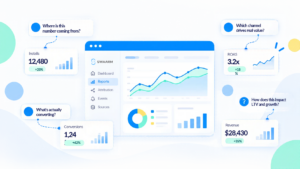
Report. Swaarm Reports Suite reports across campaigns, partners and events. A user can start from a total such as ROAS or CPA, then move to the partner, offer or event behind it, and compare the result with the previous period. The same view works for an advertiser reviewing partners, a publisher reviewing placements and a network reviewing offers.
Analyse. Performance insights in Swaarm help teams see which partners, offers and events move results, and by how much.
Optimise. Offer management and event tracking work together at this stage. Teams adjust offers, shift budget between partners, and check the effect in Swaarm Reports Suite at the next review.
Each role benefits from the same performance marketing reporting journey. Advertisers see which partners deliver the outcomes they value. App marketers follow users from install to deeper events. Publishers see how their traffic performs. Networks keep every party working from one set of numbers.
Swaarm Reports Suite: Building value beyond the baseline number
Value in Swaarm Reports Suite comes from explanation. A number becomes useful when a team can trace it to a partner, an offer and an event, and then act on it. That is how a total turns into progress deeper into the funnel. A sustainable program pairs clear metric definitions, accurate event tracking and continuous optimization. Swaarm Reports Suite helps teams measure and manage results across campaigns, partners and events.
If you can explain the number, you can optimise it. Ready to make every number explainable?
Frequently Asked Questions
How often should i review performance marketing reports?
Review pacing metrics daily, optimization views weekly and strategy views monthly. Daily checks confirm budgets and caps, weekly reviews compare partners and offers on a fixed window, and monthly reviews assess LTV and ROAS trends. A fixed rhythm keeps reporting comparable and keeps actions timely.
What is the difference between attribution reporting and campaign reporting?
Campaign reporting summarises results by campaign, partner and offer. Attribution reporting shows which touchpoint received credit for an install or event under a defined set of rules and a window. Used together, the two reports explain both how a campaign performed and why a partner was credited.
How do i explain a sudden change in ROAS?
In Swaarm Reports Suite or any reporting tool, split the ROAS report by partner, then by offer, then by event, using the same date window. The split shows whether cost, volume or event completion moved. Compare the result with the previous period and record the cause, so the next review starts from a known baseline.
What should i look for in performance marketing reporting software?
Look for event-level data, breakdowns by campaign, partner, offer and event, consistent attribution windows, and reports shared across roles. Compare how AppsFlyer, Adjust, Singular, Kochava, Everflow and Swaarm organize these views, and choose the platform that matches the way your team makes decisions.
What is Swaarm reports suite used for?
Swaarm Reports Suite is used to explain and optimize campaign results across campaigns, partners and events inside Swaarm’s performance marketing platform. Advertisers, app marketers, publishers and networks use that shared view to decide what to scale. Book a demo to see the available reports.